Build DLP Baseline Policies Around Risk, Not Features
Teams can spend a lot of time debating policy templates, sensitive information types, locations, exceptions, and enforcement modes before agreeing on what they are actually trying to prevent. A better starting question is:
How could our most sensitive information realistically leave the organization?
Across the enterprise projects we have worked on for large and small organizations, the same routes come up again and again: endpoint activity, email, and sharing and access. None of these is especially exotic, but they are all easy ways for sensitive data to end up where it should not.
A useful DLP baseline should cover those routes first. More advanced scenarios can be added once the basics are working and the organization understands the impact.
Core message: Use Microsoft Purview Data Security Posture Management (DSPM), Defender for Cloud Apps, Insider Risk Management, and sensitivity labels to work out where DLP will have the most value. Start in audit mode, use soft-blocking where users may have a legitimate reason to continue, and reserve hard blocks for scenarios where the risk and business decision are clear.
Start with Risk Visibility
Before enforcing anything, build a clear picture of where sensitive information resides, who can access it, how it is used, and where it is moving.
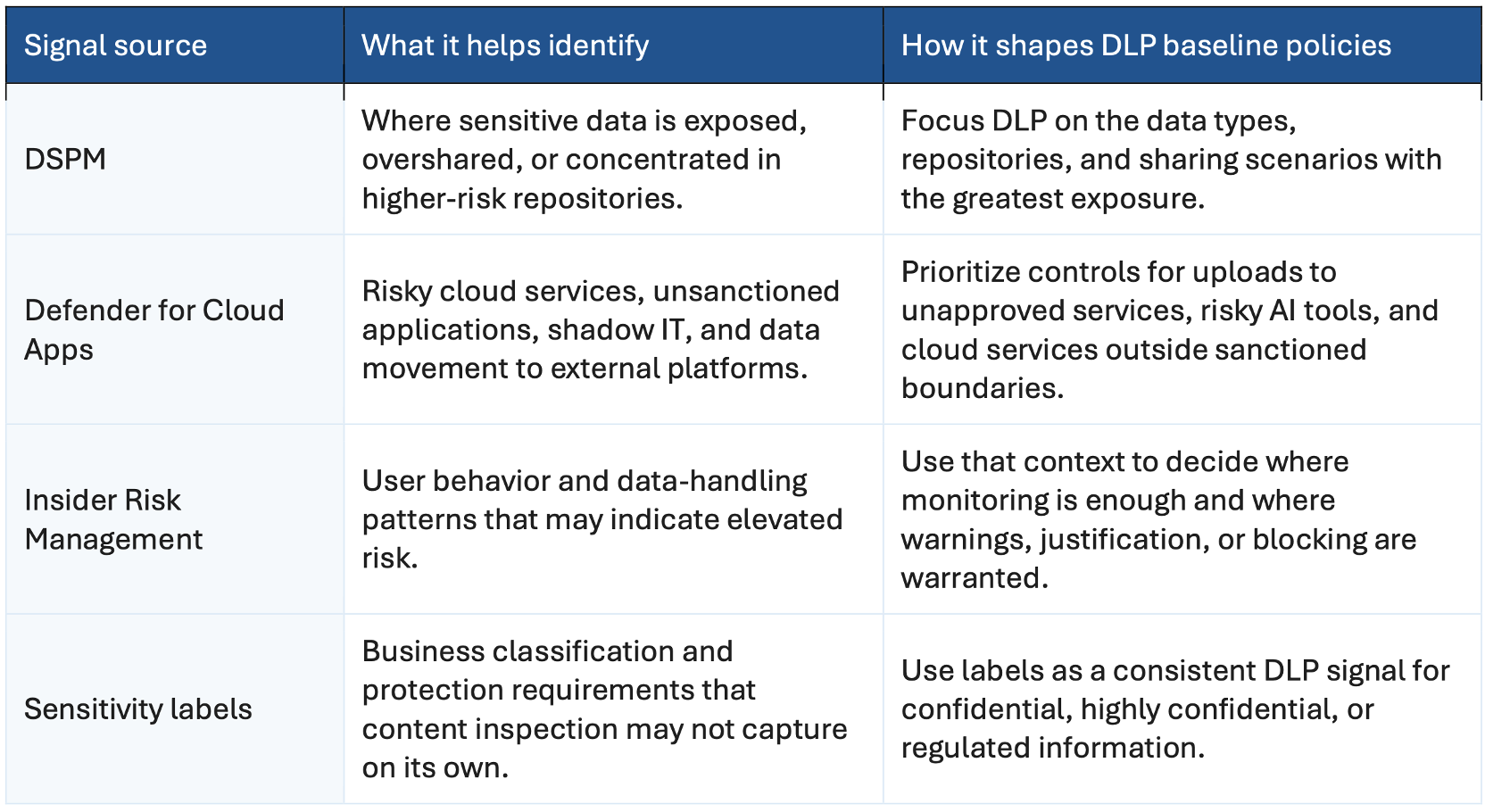
Purview DLP works best when policy design is informed by signals from the wider Microsoft data security stack:
- Defender for Cloud Apps: Show risky cloud services, shadow IT, unsanctioned applications, and movement of data outside approved platforms.
- Data Security Posture Management: Show where sensitive data is exposed, overshared, orconcentrated in higher-risk repositories.
- Sensitivity labels: Provide a business classification signal that DLP can use when applying protection and policy controls.
- Insider Risk Management: Highlight user behavior and data-handling patterns that may justify additional DLP controls.
Together, these signals help narrow the scope. Instead of writing policies for every imaginable scenario, start with the exposure you can actually see and the risks that matter most.
Risk Area 1: Devices
Endpoints are still one of the easiest places for data to leave the organization.
Sensitive files can be copied to USB devices, printed, uploaded through a browser, moved between applications, saved locally, or transferred to unmanaged storage. These are ordinary user actions, which isexactly why they deserve attention.
Endpoint DLP gives you control over many of these actions, but the first release should not be a blanket lockdown. Start with the content and behaviors that would create real business exposure if they went wrong.
- Priority content: Highly confidential information, regulated personal data, sensitive financial information, source code, and other intellectual property.
- Priority signals: Sensitivity labels, high-volume transfer patterns, DSPM exposure insights, and Insider Risk levels through Adaptive Protection.
- Practical approach: Use those signals to decide where warnings are enough and where stronger enforcement is justified. If the business has already decided an activity must never be allowed, blockbit.
The aim is targeted control, not making every endpoint action harder for every user.
Risk Area 2: Email
Email is still a major source of accidental disclosure.
The cause is often mundane: a user selects the wrong recipient, forwards a message too quickly, or sends a sensitive attachment externally without thinking through the classification or sharing method.
Email therefore belongs in almost every DLP baseline, but the level of enforcement should reflect the risk of the scenario.
- Common scenarios: Confidential documents sent externally, regulated information shared with the wrong audience, sensitive project information forwarded outside the intended group, or attachments sent when a controlled link would have been safer.
- User experience: Use policy tips, warnings, business justification, or user override when there may be a legitimate reason for the action but you want the user to stop and think.
- Escalation to block: Use hard blocking for clearly prohibited scenarios where the business impact is understood and the rule can be supported operationally.
Sensitivity labels are particularly useful here. If a file or email has already been classified as confidential or highly confidential, DLP can use that business classification as a policy signal instead of relying only oncontent inspection.
Risk Area 3: Links and Sharing
The move from attachments to links has changed the way data exposure happens.
In Microsoft 365, a link or a permission can expose information just as easily as an emailed attachment. With Teams, SharePoint, OneDrive, Copilot, and emerging agent scenarios, the issue is often access rather than a file being physically sent somewhere.
Typical examples are overshared SharePoint sites, broad internal permissions, Anyone links, external links that remain active for too long, sensitive files in locations with too many members, or AI and agents surfacing information that a user can technically access but does not really need.
For many customers, this is the point where oversharing starts to look like a bigger problem than traditional exfiltration.
DLP can reduce some of that risk by restricting access to sensitive content in supported scenarios. It does not, however, manage the underlying lifecycle of sharing links, site membership, or permissions. Those issues need classification, access governance, sharing controls, and data security posture management aswell. If excessive access is the root cause, it has to be reduced at the source.
This matters even more with Copilot and AI agents. They do not usually create the underlying permission problem; they make the consequences much easier to see.
Use Other Risk Signals to Decide What DLP Should Cover
The best DLP policy decisions are based on evidence rather than a catalogue of theoretical use cases.
Use the signals you already have to work out where a DLP control will make a meaningful difference and where another control is a better fit.
Keep the Initial Baseline Simple
Do not make the first DLP release a catalogue of every policy the platform can support. A smaller baseline is easier to test, explain, and operate.
For many enterprises, that baseline will cover sensitive information sent externally by email, highly confidential content shared externally, files copied to removable media, uploads to unsanctioned cloud services, sensitive content exposed through broad or anonymous links, and higher-risk activity involving regulated or business-critical information.
More advanced scenarios can come later. First get the baseline stable and understood by the business. In practice, that usually means starting in audit mode to see the real patterns, moving to soft-blocking where you want to influence behavior, and applying hard blocks only when there is clear evidence, business agreement, and operational readiness.
Starting with too much at once creates noise: more false positives, more support tickets, more exceptions, and more frustrated users. It also makes the program harder to explain. A smaller baseline usually gets touseful results faster.
Move from Audit to Soft-Block Before Hard Enforcement .
Going straight from design to full blocking is usually a mistake.
Audit and simulation mode gives security, compliance, and business teams a chance to see what is actually happening before users are disrupted. You can see which data is being shared, which channels generate the most risk, who is affected, where false positives occur, and which business processes would be broken by enforcement.
That information is what turns an initial policy idea into something you can defend operationally. You can tune the rule, identify legitimate use cases, and add guidance or exceptions before changing user behavior.
Once the patterns are understood, soft-blocking is often the next step. Instead of simply stopping the action,it interrupts the user, explains the concern, and gives them a chance to make a conscious decision before continuing.
Depending on the scenario, that can include policy tips, warnings, business justification, override options, links to guidance, and instructions for handling exceptions.
The value of a soft-block is not the interruption itself. It is the chance for someone to catch a mistake before sensitive information is sent, copied, shared, or uploaded. In many cases, that is enough to reduceaccidental loss without creating unnecessary friction.
Hard blocking is better reserved for actions the business has clearly decided should not be allowed and where the operational impact is understood.

DLP Is Also an Operating Model
Policy configuration gets most of the attention in a DLP project. Operations are what determine whether it works over time.
Before enforcement, decide who owns each policy, who reviews alerts, who approves exceptions, how false positives are reported, what the Service Desk should do, what guidance users will see, when a policy is ready to move from audit to enforcement, and how effectiveness will be measured.
Those questions may sound routine, but they are often what separate a workable rollout from one that simply creates tickets and exceptions.
And a policy without a clear owner eventually becomes difficult to maintain. A DLP baseline therefore needs both technical controls and an operating model behind them.
Ask the Risk Question First
Instead of asking, Which DLP policies should we enable?
Ask, Which data loss scenarios create the greatest risk, and which controls will actually reduce that risk?
For most enterprises, endpoints, email, and sharing are sensible places to start. They are not the only risks, but they are frequent, visible, and actionable.
DSPM helps show where sensitive data is exposed. Defender for Cloud Apps helps show where data is moving across cloud services. Insider Risk Management adds context around risky user behavior, while sensitivity labels provide business classification. DLP can then apply preventive controls where they make sense.
That is a much more useful role for DLP than treating it as a collection of features that all need to be switched on.
What Good DLP Looks Like
Good DLP does not come from enabling more policies. It comes from choosing a manageable set of controls that address the ways sensitive information is actually exposed or moved.
Start with what you can observe. Tune the policies in audit mode. Use soft-blocking where users may have a legitimate reason to continue, and reserve hard blocks for clear prohibitions. Then run DLP as an ongoingservice, with owners, support processes, exception handling, and regular tuning.
That is far more likely to reduce risk than building a large policy estate that users do not understand and the security team cannot operate effectively.